

Frequently Asked Questions
Ridges, data, pricing, and the rest. Find answers here.
.avif)
General
What's a browser-based architecture and why does it matter?
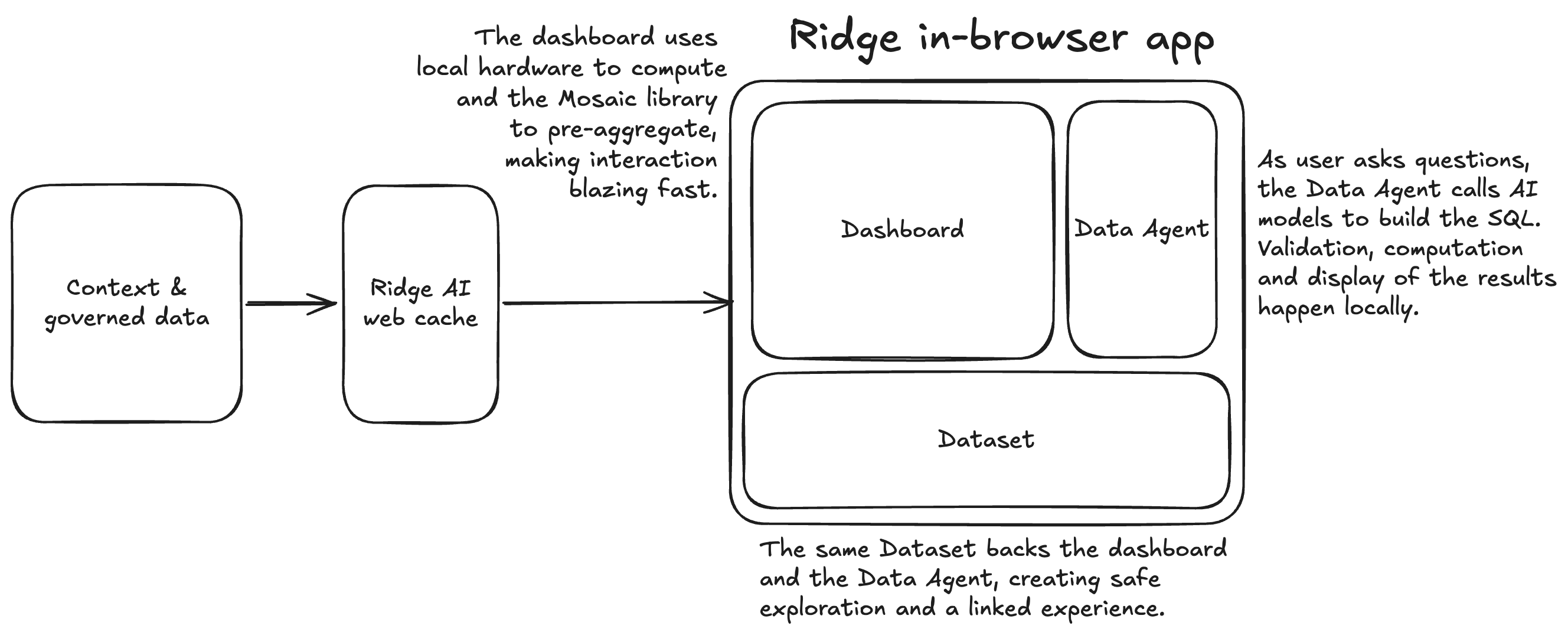
Ridge's browser-based architecture is a paradigm shift away from traditional, server-side BI tools like Tableau or Looker. Instead of querying a server every time a user interacts with a chart, the computation happens locally, in the user's browser.
How it works: Ridge connects to your backend database, lightly caches the data it needs (partitioned by customer), and injects that specific chunk of data — along with a declarative dashboard specification — directly into the user's browser. This is made possible by modern web technologies like WebAssembly (WASM) and DuckDB, which let a single-node database run inside the browser. The stack is coordinated by Mosaic, an open-source visualization library designed to push large amounts of data into the browser efficiently.
Why it matters:
- Sub-second performance: Because computation runs locally rather than making round-trips to a server, the experience is fast and highly interactive — no more waiting 10–15 seconds for pages to load like in legacy tools.
- Data ephemerality and security: Ridge is not a permanent data warehouse. Once the user closes the browser tab or ends the session, the injected data is destroyed. This clean separation of concerns means you don't have to recreate a "shadow data infrastructure" at the presentation layer.
- Lower compute costs: Moving the heavy lifting to the end user's machine takes load off your backend servers, which can save significant compute charges from platforms like Snowflake or PowerBI.
What are the advantages of Ridge AI vs. competitors like Tableau, Looker, GoodData, SiSense, and ThoughtSpot?
- Eliminating the per-seat tax and high platform fees: Traditional BI vendors (Tableau, Looker, SiSense, GoodData) require massive core platform license fees ($200,000–$500,000/year) and expensive per-viewer seat pricing that punishes customer growth. Ridge AI uses predictable, use-case-based pricing with no per-viewer seat taxes.
- Sub-second client-side rendering vs. server latency: Legacy BI tools rely on server-side rendering, resulting in sluggish 5-to-19 second load times per click that cause users to abandon dashboards. Ridge executes queries locally in the browser using WebAssembly (WASM), DuckDB, and the open-source Mosaic library, delivering instantaneous, sub-second responses.
- Solving "dashboard proliferation": In legacy systems, every new user question forces the data team to build another rigid dashboard, leading to hundreds of sprawling, abandoned reports. Ridge solves this by pairing a visual dashboard (the "head") with an integrated natural language Explore Agent (the "long tail") over the same gold dataset. Users can ask infinite ad-hoc follow-up questions without requiring a new dashboard.
- No complex code or specialist bottlenecks: Authoring in Tableau or Looker requires learning specialized, proprietary frameworks (LookML, Tableau formulas) where typically less than 1% of deployment users ever successfully author reports. Ridge's AI build flow prompts authors at the high-level business purpose level rather than requiring manual chart configuration.
- Pure presentation layer vs. proprietary walled gardens: Legacy BI platforms lock business logic into proprietary silos and duplicate data architecture. Ridge is a pure, pluggable presentation layer that connects directly to your existing data stack (Snowflake, Redshift, Postgres, S3, BigQuery, Databricks) and inherits centralized semantic definitions without creating a "shadow warehouse."
Why not just build it ourselves?
While LLMs will build you a dashboard, they might not build one that answers your question. And if they do, you next have to worry about:
- Expereince: Can you build a great experience that keeps users engaged? Can you make the experience performant, and use visual best practices so that people understand the data? Will users be able to ask questions in natural language?
- Storytelling: Will you be able to communicate the value of your product effectively? If everyone builds their own dashboard, do they have a shared understanding of the value?
- A reliable AI Data Agent: how do you build evals and guardrails, and monitor to make sure it's operating correctly?
And should you get all of that right, you next need to think about deployment:
- How do you embed it in your site?
- How do you make sure every customer sees only their own data?
- How do you keep the data refreshing?
- How do you update it when needed?
- How do you make it performant?
If you're worrying about all of that, you're likely not spending enough time on your core product. The opportunity cost of taking on all these problems at once is lost time and focus.
What is Mosaic?
Mosaic is the open-source foundation that makes Ridge's browser-based architecture extremely fast. It's an architecture for running interactive data views on the web at scale — it connects visualizations directly to analytical databases (in the browser or on a server) and coordinates them so they share data and stay in sync. The result is that even large datasets stay fast and responsive, with linked filtering across charts.
Mosaic was created by Jeff Heer (Ridge co-founder) and Dominik Moritz. You can learn more on the Mosaic project site or GitHub. For a deeper look, see our blog post, Mosaic Architecture.
How does Ridge work?
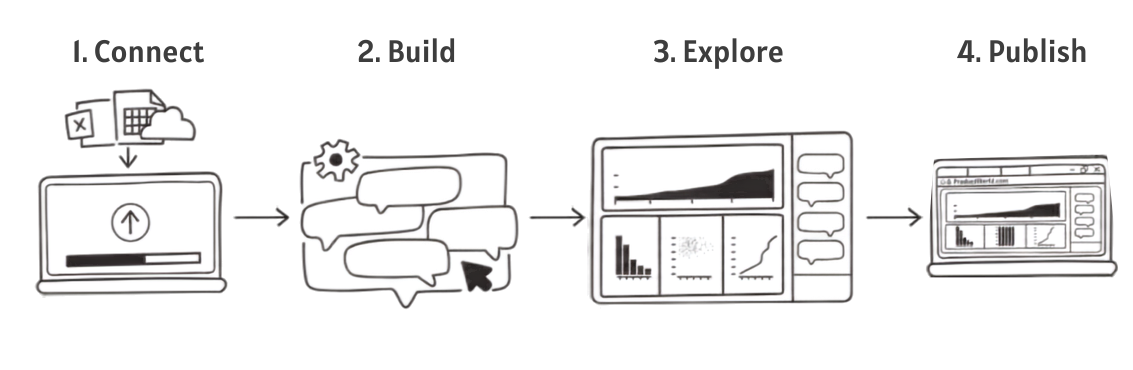
At the highest level, you connect to a data set, build a Ridge, Explore it, then embed it in your product or on the web for your users to explore.
You don't need to know a lot about how to work with data. You only need to know what business questions you want to ask.
Ridge's agents help you at each step:
- The Build Agent walks you through the process of creating and editing a dashboard.
- The Explore Agent is available alongside every dashboard, including embedded dashboards, so people can ask any data question in natural language. The Explore Agent translates that question to SQL, checks the SQL, executes that SQL locally in the user's browser, and plots the result.
- The Transform Agent supports light data preparation, like casting and null handling, if needed. Most data preparation should happen outside of Ridge, but the Transform agent is there if you need it.
Pricing
Why do we price per Ridge?
A Ridge is one embedded dashboard with a paired Explore Agent — a single use case. Pricing per Ridge keeps costs predictable and aligned with the value you get, rather than tying them to seats, queries, or compute, which lead to unpredictable bills. It's easy to start with one Ridge and expand as you add use cases. See the full breakdown on our pricing page.
How much does Ridge cost?
Plans are priced per Ridge:
- Ridge Studio: $80/mo ($900/yr) — build and validate a Ridge before it's customer-facing; up to 5 Ridges, up to 5 in-app users, 1,000 monthly views; no data refresh, embedding, or partitioning
- Solo: $450/mo ($4,800/yr) — everything in Ridge Studio plus data refresh and embedding of 1 Ridge; up to 5 Ridges, up to 10 in-app users, 10,000 monthly views; no customer partitioning
- Standard: $850/mo ($9,600/yr) — everything in Solo plus customer partitioning for up to 1,000 customers; up to 5 Ridges, up to 10 in-app users, 10,000 monthly views
- Enterprise: Custom pricing — everything in Standard plus multiple embedded Ridges and custom partitioning, with custom Ridges, users, and view limits
A 30-day free trial includes everything on the Standard plan. All plans include the Build, Explore, and Transform Agents. For full details and custom enterprise options, see our pricing page.
Ridges
How do I build a Ridge?
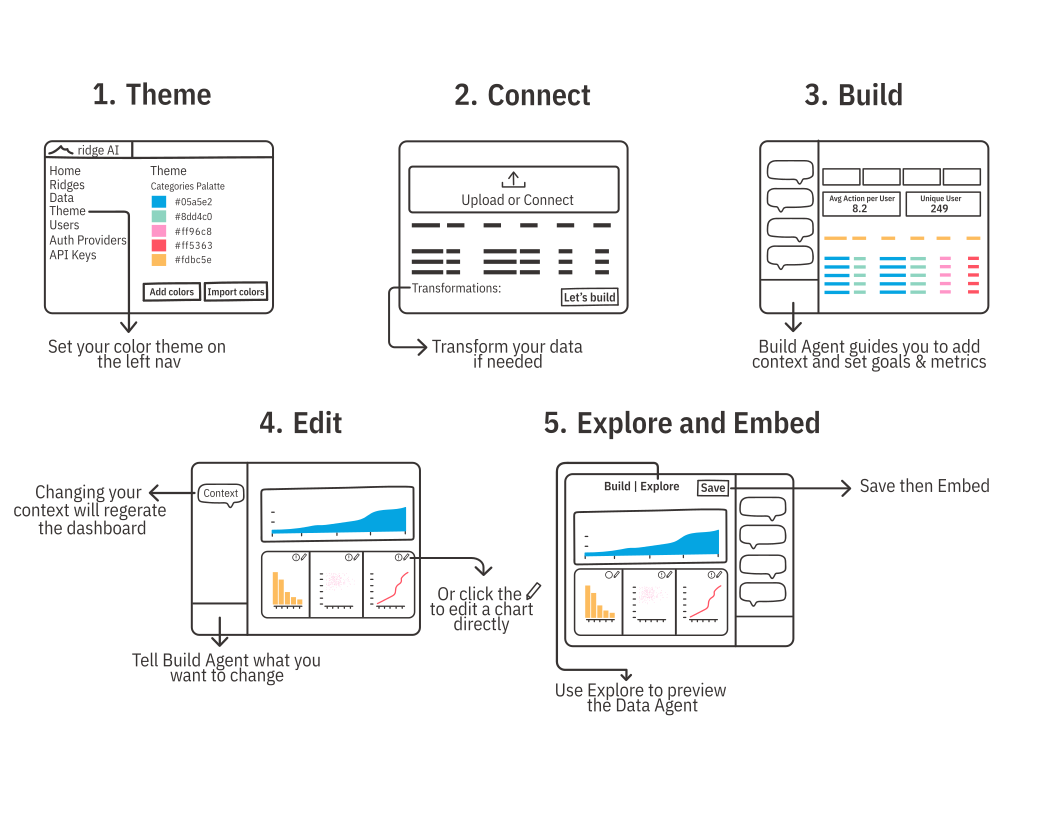
To build a Ridge, click "Add Ridge" on the Home screen or Ridges page. The Build Agent will walk you through the process of building. See the help video above for a detailed walkthrough.
If you want custom theming, set that before you begin in "Theme" on the left hand nav.
What's a Ridge?
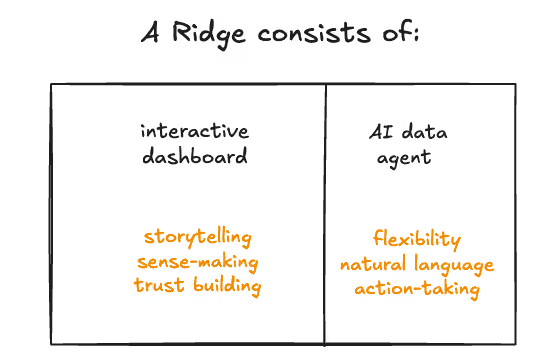
A Ridge is a data experience consisting of one dashboard and a paired Explore Agent that work together for a single use case (such as sales or usage data). A Ridge is backed by a single Dataset.
The paired structure of the Ridge combines two distinct functions: The Dashboard provides visual sense-making, giving users a high-level understanding of the data's shape and key metrics. The Explore Agent acts as a natural language exploration tool, allowing users to ask free-form follow-up questions and solve the long tail of specific queries that aren't explicitly visualized on the dashboard. Linked interactivity means that either can respond to filters or selections in the other, extending the exploratory power of both the dashboard and Explore Agent.
By bundling these two elements into a single instance, businesses can quickly give their customers both structured insights and the freedom to independently explore data. This also solves the dashboard proliferation problem of traditional BI tools, where a new dashboard must be built to answer every single customer request.
In addition, by constraining the Explore Agent to only the dataset backing that specific dashboard, the quality of results is better because it's more focused. You can be sure that the data the customer sees is correct and relevant, rather than exposing all your data.
Can I change the dashboard I get?
Yes. If you got results that you don't love, try this:
- As a first step, look at your data. If it seems like it needs work, you can try transforming it in the Transform Agent.
- Add context in the Build Agent: definitions, notes, even call transcripts. Ridge uses these as foundational elements to build a Ridge. Changing them will regenerate the Ridge and give you a new starting point.
- If the dashboard is mostly but not all the way correct, you can edit it to get it all the way there.
How do I edit a dashboard I created?
From the Ridges page, find the dashboard and click "Continue Building."
Then you can edit several ways:
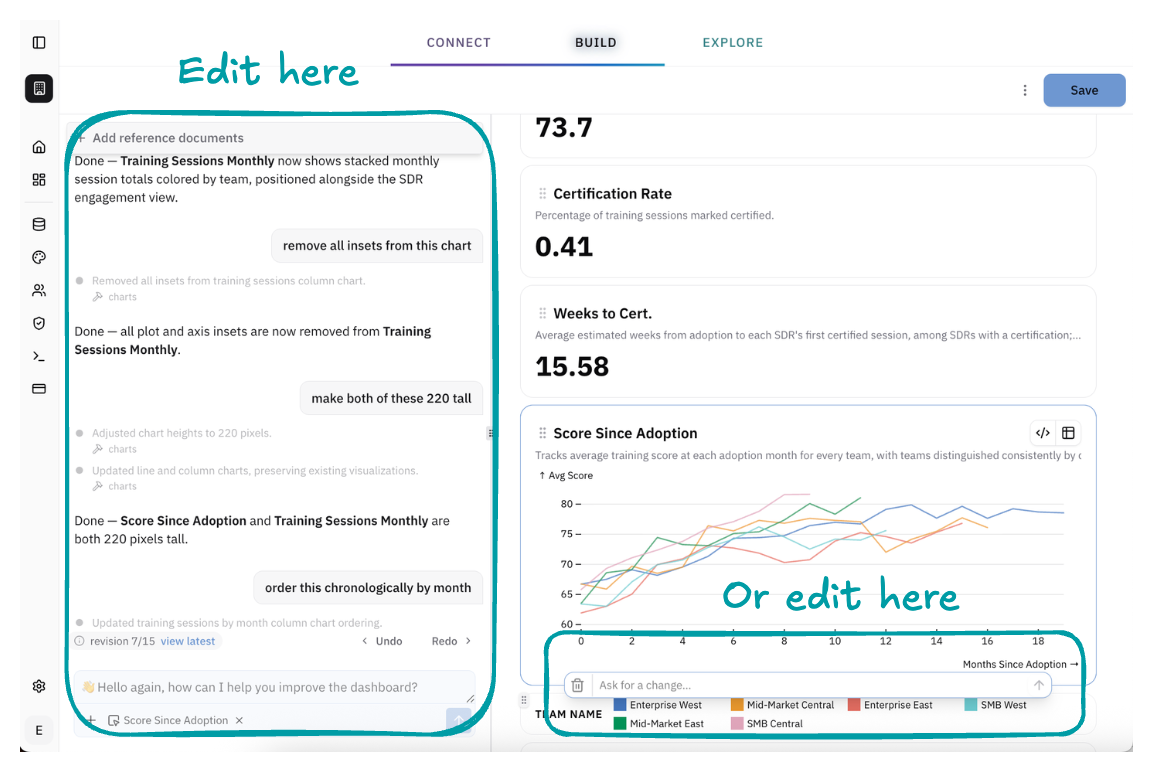
- Click the chart you want to edit, give the Build Agent instructions at the bottom of the chart, and tell the Build Agent what to change.
- Type into the Build Agent chat on the left side of the screen directly.
- Directly interact with Ridge to delete charts, edit titles and other text, and do other common tasks. See more about Direct Interaction here.
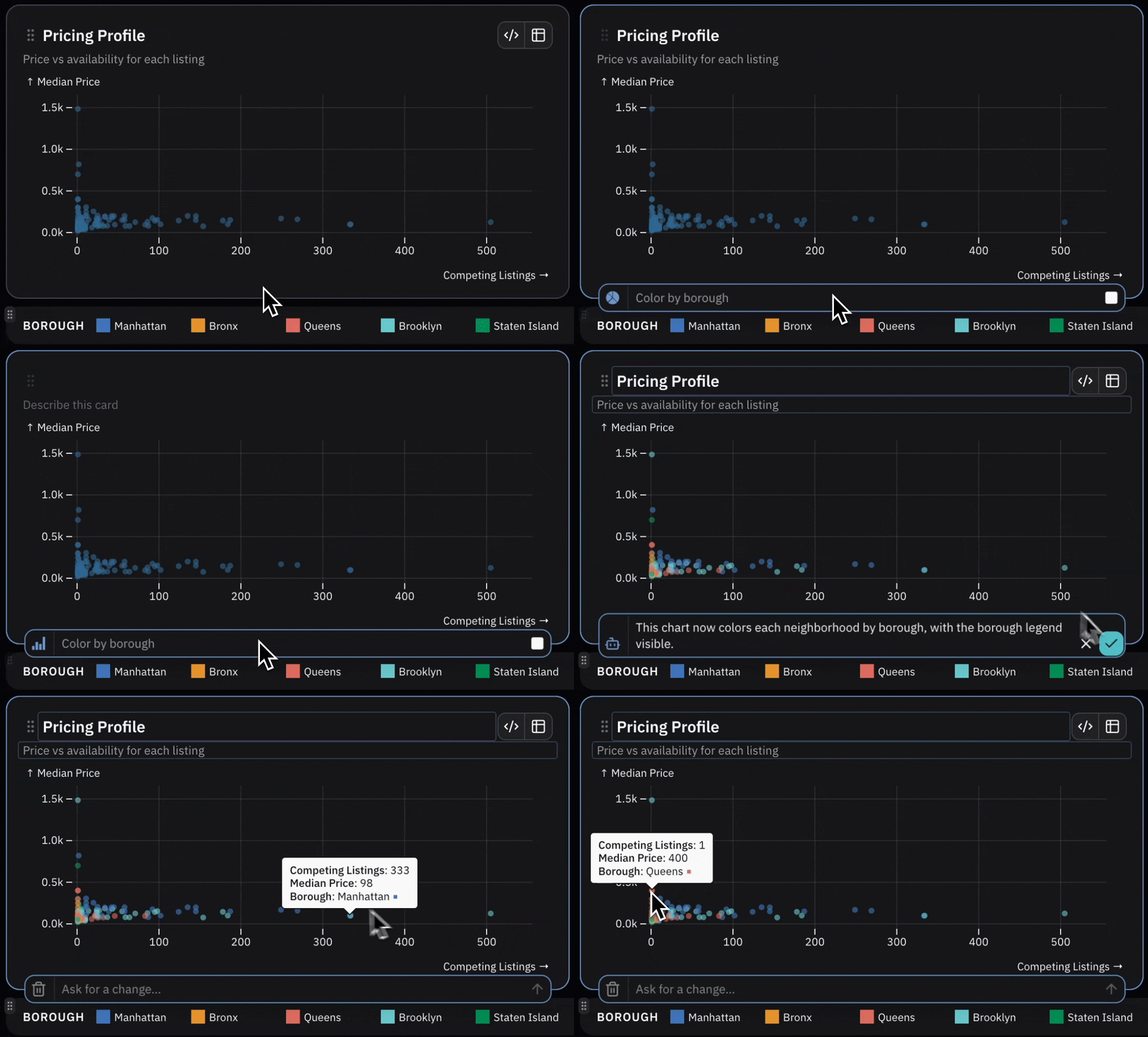
What's the difference between editing on a view and editing in the Build Agent?
You can edit in both places! The only difference is that the Build Agent automatically understands which chart you've selected when you edit directly on a chart.
Pro tip: you can select one or more charts in the dashboard to edit at the same time in the Build Agent chat on the left.
Data
What's the difference between a Dataset and Data Connection?
They are related:
- A Dataset backs a Ridge. A Dataset can be generated from a Data Connection or file upload.
- A Data Connection is a connection to a live data source such as Snowflake or Databricks.
Only Datasets that come from Data Connections (not files) can be refreshed or partitioned.
Is data stored locally?
Yes, during the browser session.
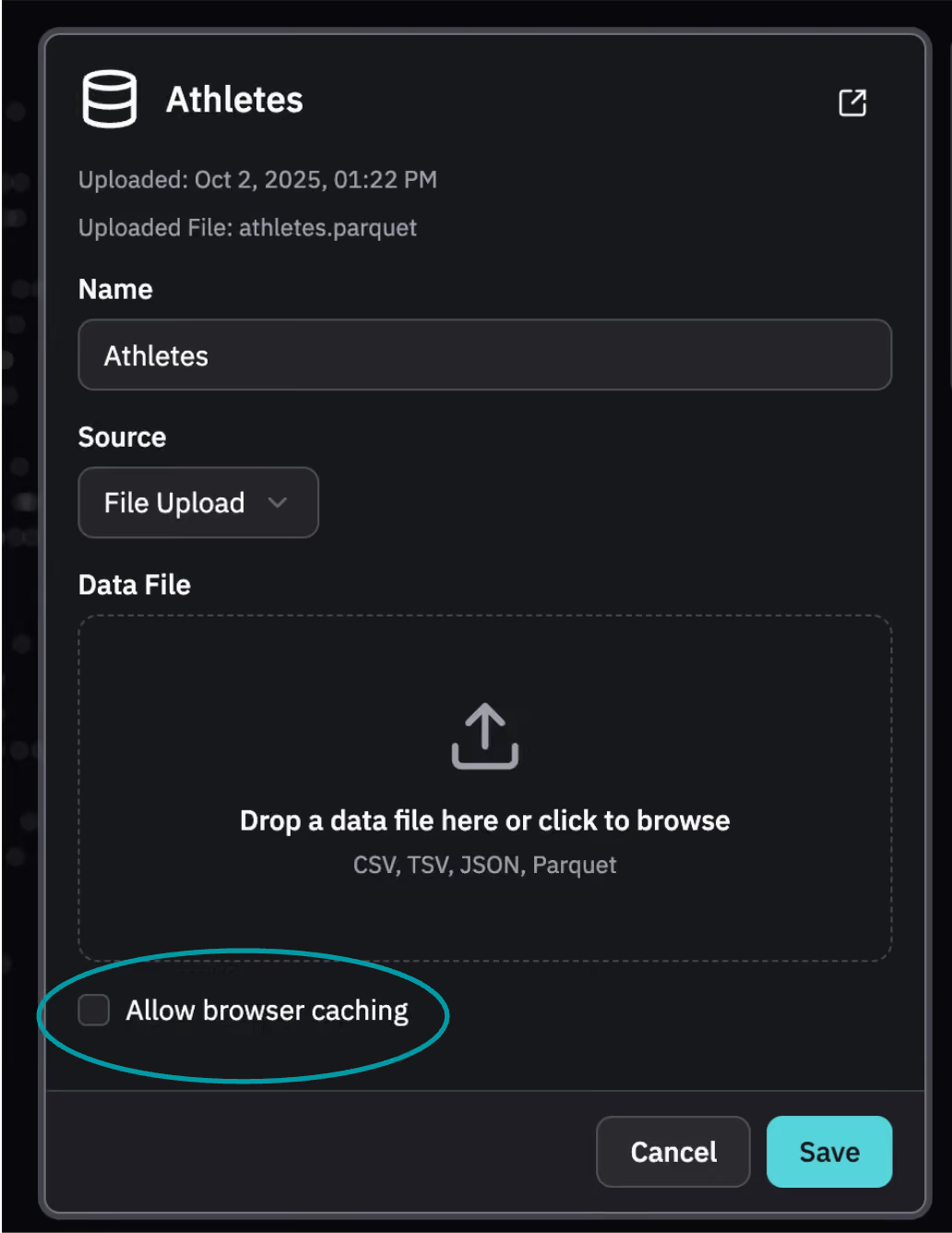
Here's how it works: When a user access a Ridge, the data is brought into a user's browser. When the user closes the broswer window, the data is deleted by default. On subsequent loads, data will have to be re-downloaded to the browser. There shouldn't be an effect for a user who loads, interacts, and leaves, if they don't return for a subsequent session.
For each Dataset, you can choose to cache the data in a user's browser, which speeds up subsequent loads. However, that option is off by default so that Datasets start in the most secure state:
What Data Connections does Ridge support?
Ridge supports enterprise data sources including
- Databricks
- Snowflake
- Google BigQuery
- S3
- R2
- Apache Iceberg
- PostgreSQL
- Microsoft Fabric OneLake
What does "partitioning" mean?
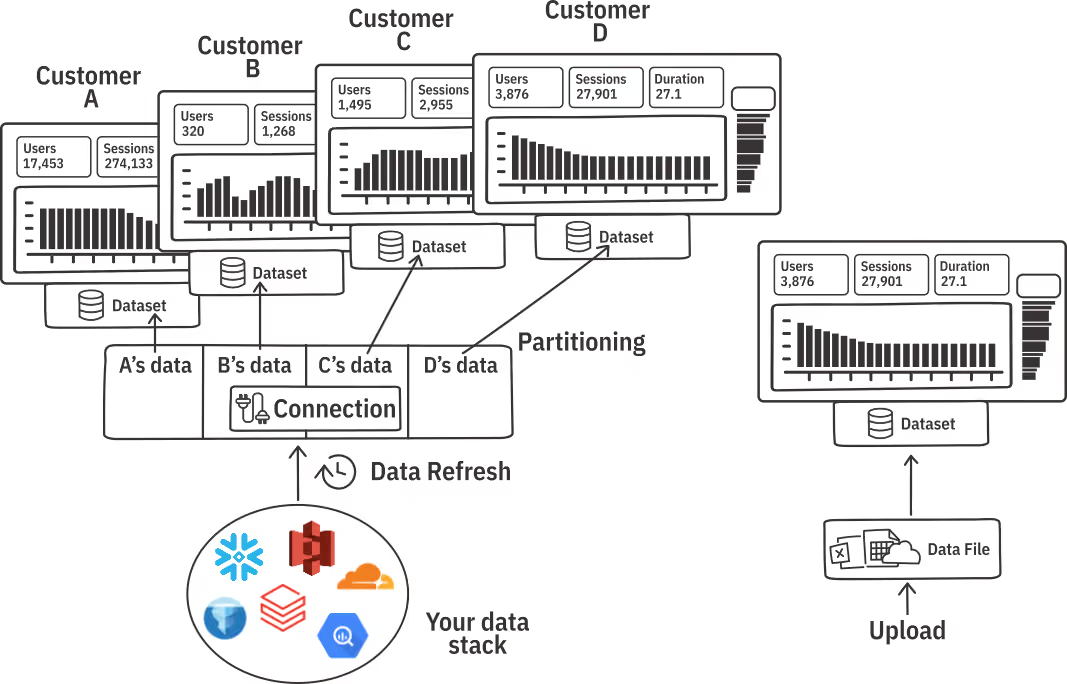
Partitioning supports customer separation in your data, similar to multi-tenancy: Partitioning ensures that end-users only have access to their own specific data. This guarantees that "Customer A" only sees their own data and "Customer B" only sees their own data, even though they are on the same embedded dashboard.
When a user accesses the embedded dashboard, Ridge AI injects only their specific, partitioned chunk of data directly into their web browser. This ensures that the data is completely secure and sandboxed, while allowing the dashboard to maintain sub-second browser-based performance.
How do I partition data for each customer?
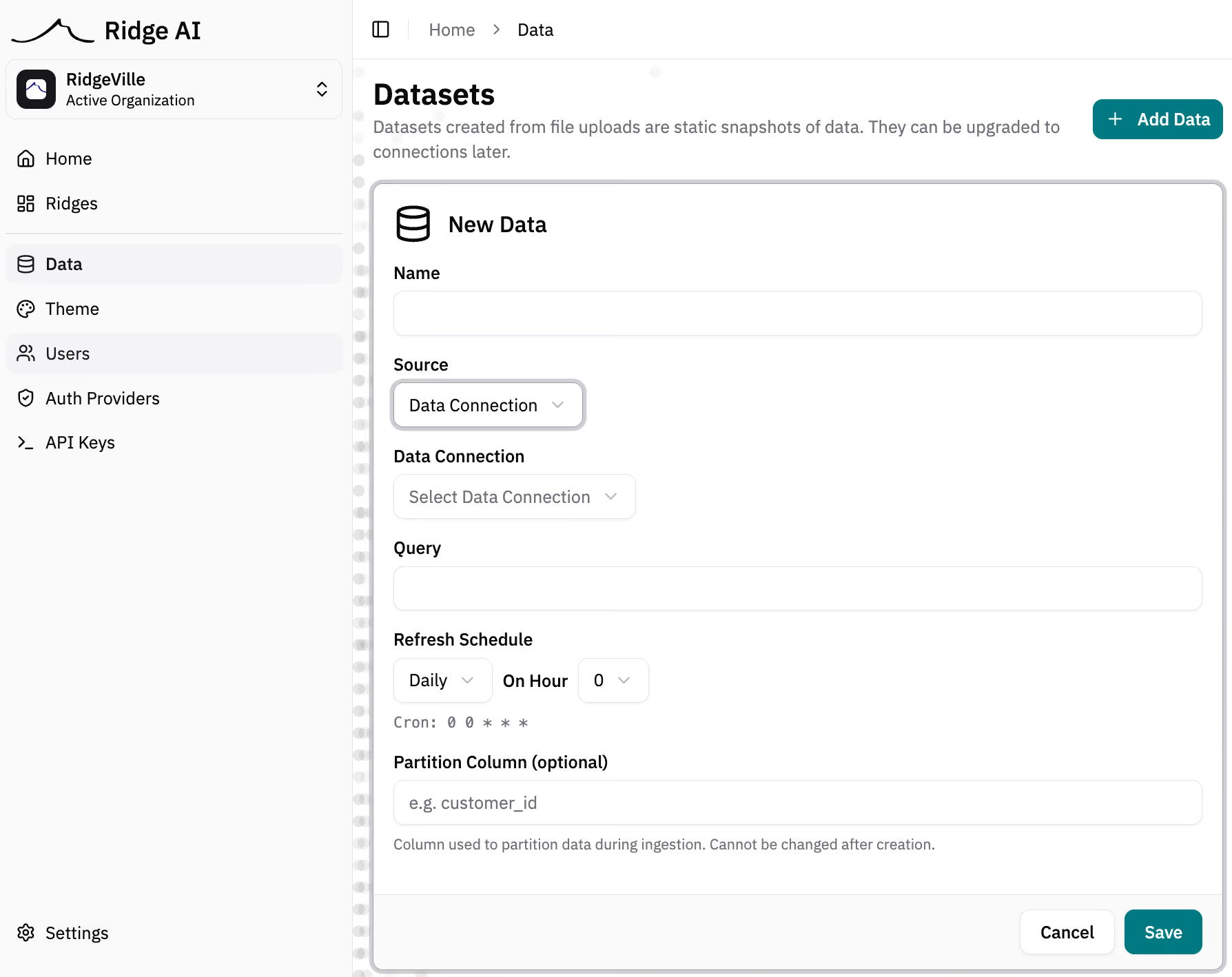
Set the partition field in the Dataset. Partitioning is available for Datasets with Data Connections only, not uploads.
How do I refresh data?
Set the refresh schedule in the Dataset. Refresh is available for Datasets with Data Connections only, not uploads.
Why doesn't Ridge help with data engineering, joins, and things like that?
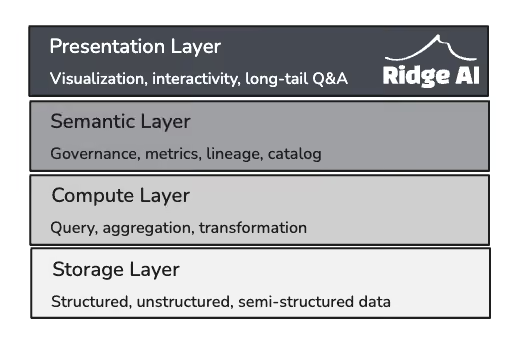
Ridge is designed to sit on top of your existing data stack, not replace it. We think your data semantics are better centralized across your data stack, rather than locked up in dashboards. This is a major philosophical change from the last generation of tools.
You don't need an explicit semnatic layer to use Ridge-- it will use as much or as little semantics as you have available.
Focusing on the human-data interface also lets us stay focused. AI is powerful, but needs a lot of scaffolding to work well. By specializing in data presentation, we can do it better than if we tried to do everything.
Embedding
What's the difference between iFrame and server-based embedding?
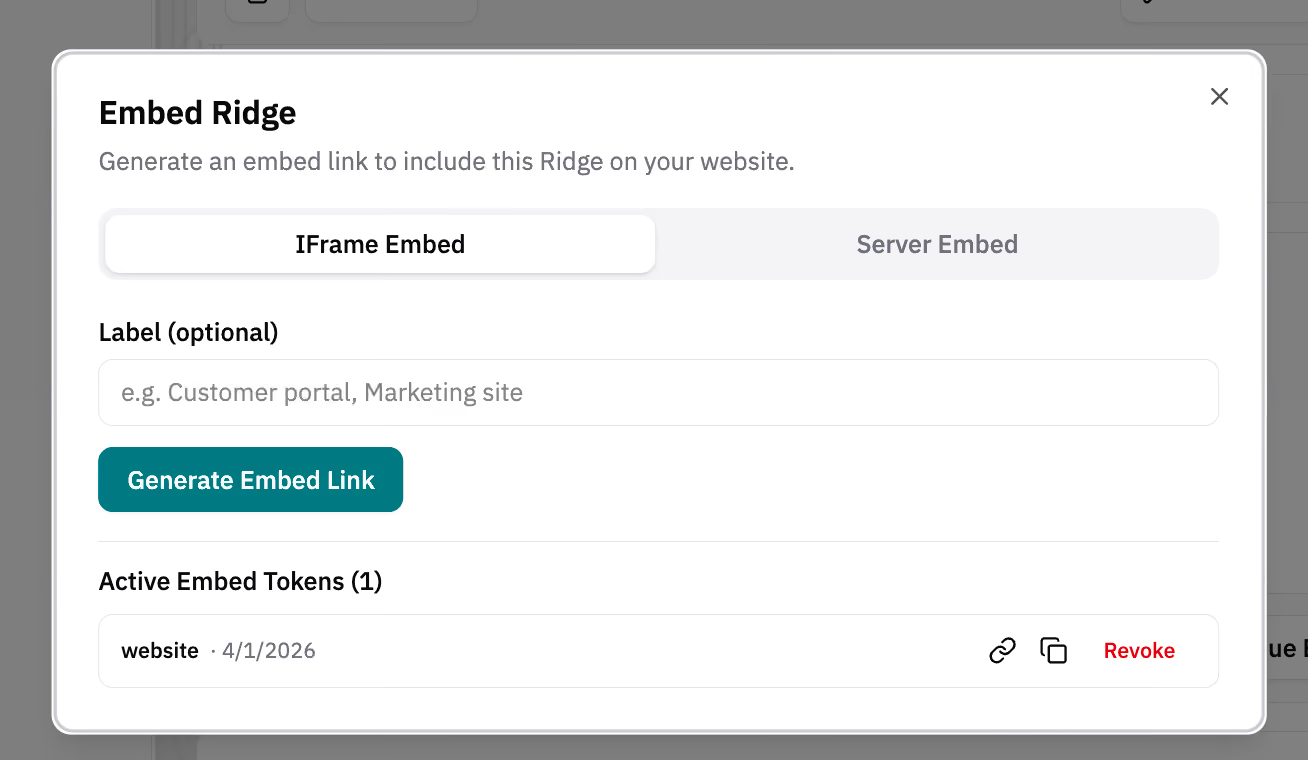
iFrame embedding is the simplest approach. Just generate an embed token, copy the iFrame link, and put that code in your website code, wherever you want your embedded visualization. Ridge will track the embed tokens for each Ridge so you can reuse or delete them.
Server-based embedding has several advantages:
- Uses JWT to automatically authenticate your end-users when they navigate to an embedded Ridge.
- Allows you partition data by whatever field you choose (usually account ID or customer ID). This means data stays secure and every end-user sees only their own data.
- Allows you to inherit theming from the embedded page. Both are found in the Ridges page when you select a Ridge.
Server-based embedding requires some server-side code and usually takes customers less than 30 minutes to set up.
How do I change colors?
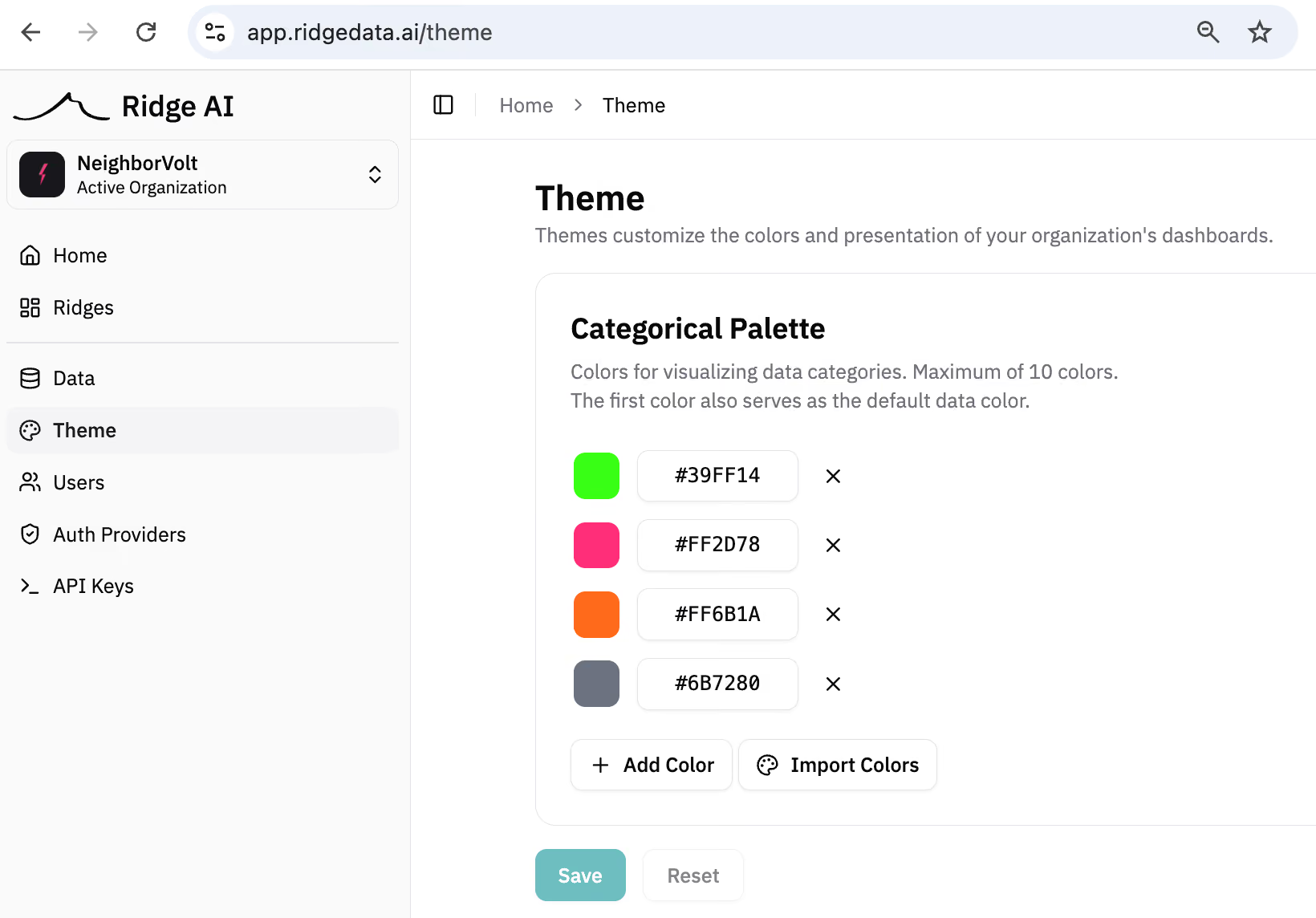
- You can change colors directly in the Build Agent.
- If you have theme colors, you can set them by clicking on "Theme" on the left nav.
What's the flow when a user visits your site?
When you embed a Ridge in your site, the flow for end users looks like this:
- Users visit your site. Your app authenticates them.
- When they navigate to a page with an embedded Ridge, your server issues a JWT / signed token to our webapp to authorize them.
- The Ridge itself is whitelabeled — it looks and feels like your site, and users don't have to log in again.
- Our webapp sends the data needed for the dashboard and dashboard specification directly to the user's browser. Each user sees data only for their own organization.
- When a user asks a question of the Explore Agent, the Ridge manages the request to the AI providers. The AI provider returns SQL, which Ridge checks for accuracy then executes locally on your user's machine. All AI-generated queries are executed within the same permission and dataset boundaries of the Ridge itself.
- The user sees fresh data, refreshed on a schedule you define. Because compute happens in the browser, data warehouse compute is significantly lower than with server-centric BI tools.