Build with AI. Deploy with Ridge.
Ridge AI deploys AI-native data apps you can share with customers: fast, secure and embedded, on fresh data, with an agent that answers the questions the dashboard doesn't.
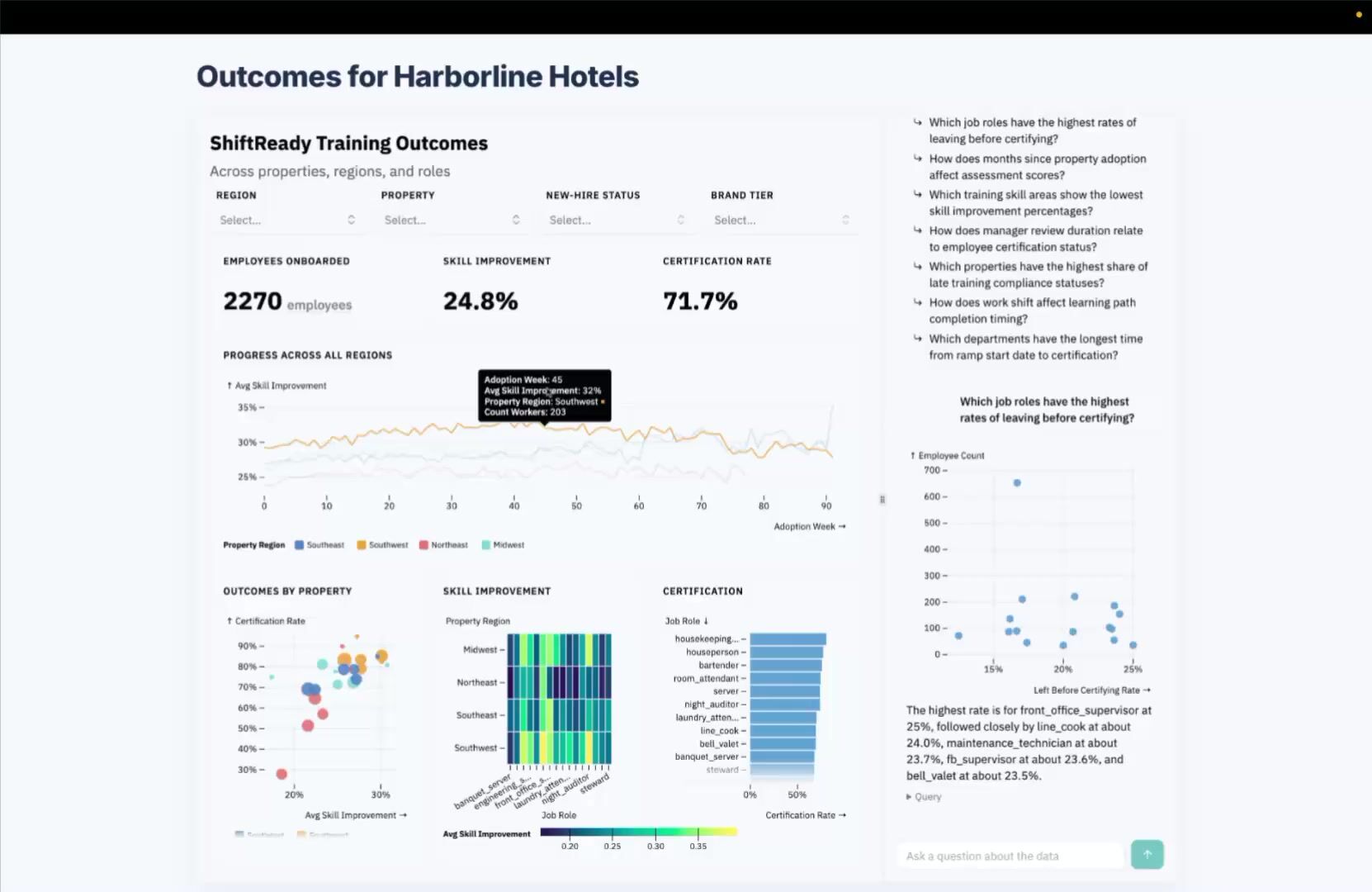
Build anywhere. Deploy with Ridge.

Build in Claude or another AI tool, then bring the image to Ridge to rebuild against the full data set and deploy as a data app.
Or build in Ridge with the Build Agent, which guides you like a good analyst would. The Ridge MCP lets you build without leaving Claude or ChatGPT.

Ridge connects to your data, keeps it fresh and partitions it by customer. It's fast, interactive, and comes with an Explore Agent for long-tail questions.
Embed in your product or site to deliver production-grade analytics where people are already working.

Ridge offloads computation for dashboard and Explore Agent queries to the browser, so usage doesn't turn into a budget nightmare.
That same browser-based architecture means incredible performance for your end users, even on millions of rows.
In the age of AI, building is easy. Delivering is the hard part.
“Ridge also addresses the build-versus-buy question product teams now face as AI coding tools make custom dashboards look easy. The hard part of customer analytics is tenancy, validation, and upkeep.” Herb Blecher, Research Director, Enterprise Management Associates (EMA).
In hands-on testing, EMA measured sub-second dashboard interaction on datasets up to 3 million records, with each embedded session scoped to its tenant and an Explore Agent alongside every dashboard.
How to Deploy AI-Native Analytics
Each option fits a different job. Claude Dashboards are great for ad hoc analytics, hard to deploy. Claude info as of November 2026, from Claude's own answer: create an artifact and ask "How much data can you display?" and "How would I deploy this?" We update this table as Claude changes.
Claude Dashboards
Building In-house
Ridge AI
Building artifacts
Quickly create HTML artifacts from a prompt
Design and code artifacts yourself. Typically takes months to quarters.
Build from a Claude Dashboard, from an image or directly in Ridge Build Agent. MCP available.
Data size
8 MB max; data shrunk to fit
Performance vs. size tradeoff
No 8 MB cap: millions of rows at a time
Row-level data
Summarized, no row-level access
Row-level if you build the pipeline
Row-level access
Performance and interactivity
Limited by how data is aggregated
Performance tuning, forever
Sub-second filtering and drill-down on all the data
Data refresh
A snapshot from when you prompted
A refresh pipeline you build and run
Kept fresh on a schedule you set
Partitioning and governance
Not built in
Permissions you build, test and maintain
Per-customer partitioning using JWT
Embedding
Not embeddable: a link or a screenshot
Custom front-end work
Via iframe or JavaScript (Embed SDK), themed to your app
Conversational analytics for end users
No end-user chat
An AI agent with guardrails you build
An Explore Agent on the whole dataset
Usage analytics
None
Tracking you build
Built in: see who uses what
Sharing
Viewers need a Claude license; broad rollout needs a BI tool. Data travels in the file.
Hosting and logins you build
Share or embed for any viewer. Data stays in your stack; access via login or JWT.
Costs
Token and warehouse costs for every dashboard refresh
Warehouse queries on every click
Priced per use case, not per seat. Compute runs in the viewer's browser.
From people who've shipped analytics before.
Founders, product leaders and data leaders on what changes when analytics are fast, embedded and AI-native.
"Sub-second buttery interactions."

"Ok, this is really f***ing cool."

"Being able to ask free-form questions in the data agent makes dashboards vastly more flexible and useful."


“Why not just build it all with Claude?”
Do. Build in Claude. Then the real work starts: embedding it in your product, making sure every customer sees only their own data, keeping it refreshed and fast, updating it when the business changes, and putting guardrails on an AI agent your customers will use.
Bring your Claude prototype to Ridge and deploy it with all the data, not just the aggregation Claude creates to make your data fit in an artifact.
Ridge does that part, and Ridge is SOC 2 Type II compliant. You can build all of that yourself. Or you can spend that time on your core product.
Questions about deploying AI-native analytics
Answers about Ridge AI, Claude Dashboards and pricing. Updated November 18, 2026.
What is AI-native analytics?
AI-native analytics are dashboards and agents created with AI instead of built by hand in a BI tool. You describe what you need, or show an image or a sketch, and AI builds it. People can then ask follow-up questions in plain language. Ridge's Build Agent creates them, and Ridge deploys analytics built in Claude, ChatGPT or legacy BI. Each one becomes a Ridge: a data app with a dashboard and an agent on the same live data.
Can I deploy a Claude dashboard to my customers?
Not on its own. As of November 2026, a Claude dashboard is an artifact: a snapshot of data, shrunk to fit, with no refresh, no per-customer permissions and no embedding. You can share it to others with Claude licenses. Ridge turns it into a data app: build from an image or the HTML of the dashboard, and Ridge rebuilds it on your full dataset, keeps it fresh and embeds it in your product.
Is it safe to send a Claude dashboard to a customer or partner?
Only if they can keep the data. As of November 2026, a Claude dashboard shared as an HTML file carries its data inside the file. Anyone who gets the file has the data, it won't refresh, and you can't take it back. With Ridge, the data stays in your stack, each viewer gets access through your app's login or a JWT, and you can change or remove access at any time.
How much does Ridge cost?
Ridge is priced per Ridge, a data app for one use case (one dashboard plus its Explore Agent), not per seat or per query. Ridge Free includes up to 5 Ridges and 100 views a month on file-based data. Solo is $450 a month or $4,800 a year and adds data refresh and embedding. Standard is $850 a month or $9,600 a year and adds partitioning for up to 1,000 customers per Ridge. Enterprise pricing is custom. See all plans.
How long does setup take, and what do I need?
The Build Agent builds a Ridge in minutes. Ridge connects to Snowflake, Databricks, BigQuery, Iceberg, Fabric OneLake, S3 and R2, or a file upload. Embedding takes a developer: an iframe with a signed JWT for each viewer, or the Embed SDK for deeper integration with your app. See data connections.
How much data can Ridge handle?
In hands-on testing by Enterprise Management Associates (EMA) in October 2026, Ridge dashboards responded in under a second on datasets up to 3 million records. Ridge runs queries in the browser, so very large event-level data should be aggregated to the level the dashboard needs first.
Who is Ridge not for?
If you need a one-off answer for yourself, Claude or ChatGPT alone is enough. Ridge is for analytics you share with many people, on data that changes: customer-facing analytics in a SaaS product, or dashboards for executives and field teams.
Can I build Ridges from Claude or ChatGPT?
Yes. The Ridge MCP lets you build, publish and embed Ridges from Claude or ChatGPT, without leaving the chat. Learn about the Ridge MCP.
What happens when I sign up?
You enter your work email and get a sign-in link. You start on the Free plan, with no credit card. Connect your data and build up to 5 Ridges. When you're ready to embed, upgrade to Solo or Standard.