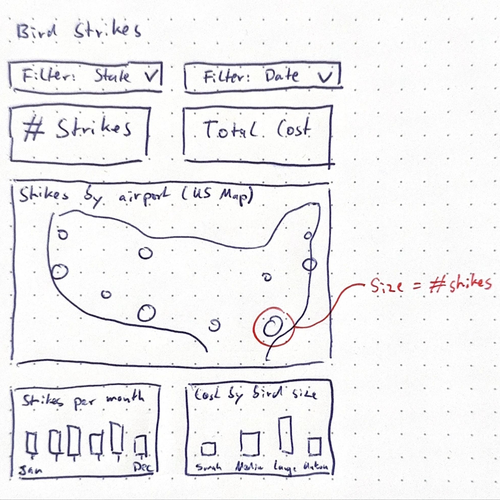
In the months since we launched Ridge AI's Build Agent, dozens of customers have used it and we've run many rounds of evaluations. Their feedback helped us see how to get closer to our vision: an analyst that helps you identify the right questions and build an effective dashboard around them.
Build Agent v2 is better at every stage of a build. It asks more when your goal is broad and less when it is already specific. It plans what the dashboard needs, keeps that plan in view as it builds, and reflects on the result. If you want to take a build in another direction, explicit undo and redo controls let you move back and try a different approach. The initial build still takes less than three minutes.
More flexible context-gathering
Build Agent v2 starts with what you are trying to learn or decide. If you have already given it a clear brief, it can move quickly. If you are still working out what matters, it asks focused follow-up questions and offers directions grounded in your data.
Before building, the agent summarizes the goal and the questions it believes the dashboard should answer, then asks you to confirm or correct its understanding. This gives you a clear checkpoint without making you work through the same questionnaire every time.
The agent also makes better use of context you have already documented. Give it metric definitions, an analysis plan, or a business-rules memo and it can consult those documents when relevant questions come up during the build, instead of asking you to repeat information you have already provided.
More agency, planning & reflection
Visual analysis is rarely a straight line. You form a question, choose a useful view, see what it reveals, and adjust. Build Agent v2 works in much the same way.
Once it understands your intent, the agent creates a plan for the dashboard and uses that plan throughout the build. It keeps the full brief in view, including requests that take several steps to complete, and checks the dashboard as it comes together. If a choice does not hold up, it can reconsider it. If part of the request cannot be completed as intended, it tells you rather than quietly leaving it out.
It also keeps track of the goals, decisions, and caveats that shaped the dashboard. That context carries into later refinements, so a change you request an hour later remains connected to what the dashboard is for. Each round ends with a short recap and, when something still needs attention, a suggested next step.
Build Agent v2 asks more purposeful questions, follows through more reliably, and stays focused on the analysis you need.
Safe exploration with undo/ redo
We’ve made undo/ redo explicit, so you can explore safely. The Build Agent autosaves at every step.
Other improvements
You will also see several improvements across the build experience:
- Charts composed as a dashboard. The agent chooses each chart's shape and orientation with the surrounding layout in view.
- More room for data in the browser. Ridge now loads data more efficiently, reducing browser memory use and increasing the headroom available for larger datasets. The practical limit still depends on the width and shape of your data.
- Feedback on every reply. Use thumbs up or thumbs down on any assistant response in the build flow.
Side quest: more data in the browser
As part of this process we re-engineered how Ridge uses data in the browser, ultimately allowing for about 2x larger data sizes. Ridge can already handle millions of rows, depending on the data width and shape, with smooth interactive performance in the browser.
The backstory on the Build Agent
We've always thought of Ridge's Build Agent like a well-trained analyst who can help you get to the heart of the business story in your data. Build Agent v2 is a big step closer to that vision.
The Build Agent to inspect the domain of the data to allow it to make suggestions, solving the blank screen problem. From there you can go in many directions. For example, with sales data, you could be trying to understand:
- Demographics: What are my customers like and how are they different my prospects?
- Growth: Which regions are growing fastest, and why?
- Retention: What factors lead to better or worse retention?
The right dashboard depends on which of those questions matters to you, who will use the analysis, and what decisions it should inform. Build Agent v2 can determine which of those details it needs to ask about and which it can reasonably infer from your goal, your data, and the context you provide.
Unlike vibe-coding tools, the Build Agent doesn't just assume your goals and give you a pretty dashboard. It works like an analyst to deeply understand the context and domain so that it can be a thought partner.
That makes it equally useful when you arrive with a detailed brief and when you only know that there is a question worth investigating.
Available today in beta
Build Agent v2 is live for all beta customers, including existing dashboards. There is nothing to migrate or turn on. Over the coming weeks, we'll continue ironing out the remaining issues as we prepare for general availability.
We’d love to hear your feedback. Use the thumbs up/ thumbs down in the Build Agent, or send us a message on LinkedIn. And gracious, if you haven’t yet signed up for the beta, do it now using the button on the nav!
See the Build Agent v2 and other videos on Ridge AI's product and technology on our Youtube channel.